![kt-logo-kb.png]](https://support.kindertales.com/hs-fs/hubfs/kt-logo-kb.png?height=40&name=kt-logo-kb.png)
This feature is designed for situations where the subsidy provider consistently pays an amount that differs from the standard subsidy calculation for the duration of a child's enrollment.
For example:
- A child's subsidy is expected to pay $100.00 per month.
- The subsidy provider has approved the child for $115.00 per month.
- The additional $15.00 is expected every month while the child remains enrolled.
With this update, you can record the expected adjustment in advance, allowing your subsidy forecasts and outstanding balances to accurately reflect what you expect to receive.
Who Can Use This Feature?
This feature is available to Superadmin users.
Enabling Adjustable Subsidies
Before an adjustment can be applied, the subsidy must be configured to allow adjustments.
- Navigate to Settings -> Billing -> Subsidies
- Enable the Is Adjustable checkbox.
- Save your changes.
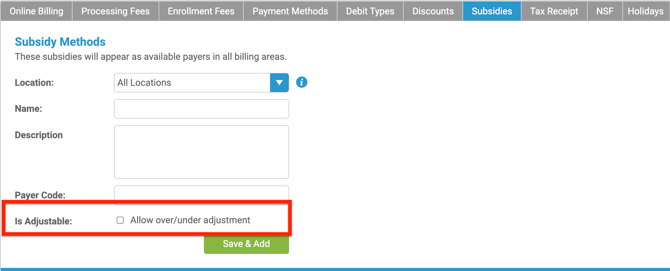
Once enabled, this subsidy accepts recurring overpayment or underpayment adjustments when it is assigned to a child's program.
Adding a Subsidy Adjustment
When adding or editing a subsidy arrangement for a child's program:
- Add the adjustable subsidy as normal.
- Select + Adjustment.
- Choose the adjustment type:
- Overage
- Underage
- Enter the adjustment amount.
- Save the arrangement.
Example
Standard subsidy amount: $100.00
Adjustment Type: Overage
Adjustment Amount: $15.00
Expected subsidy payment: $115.00
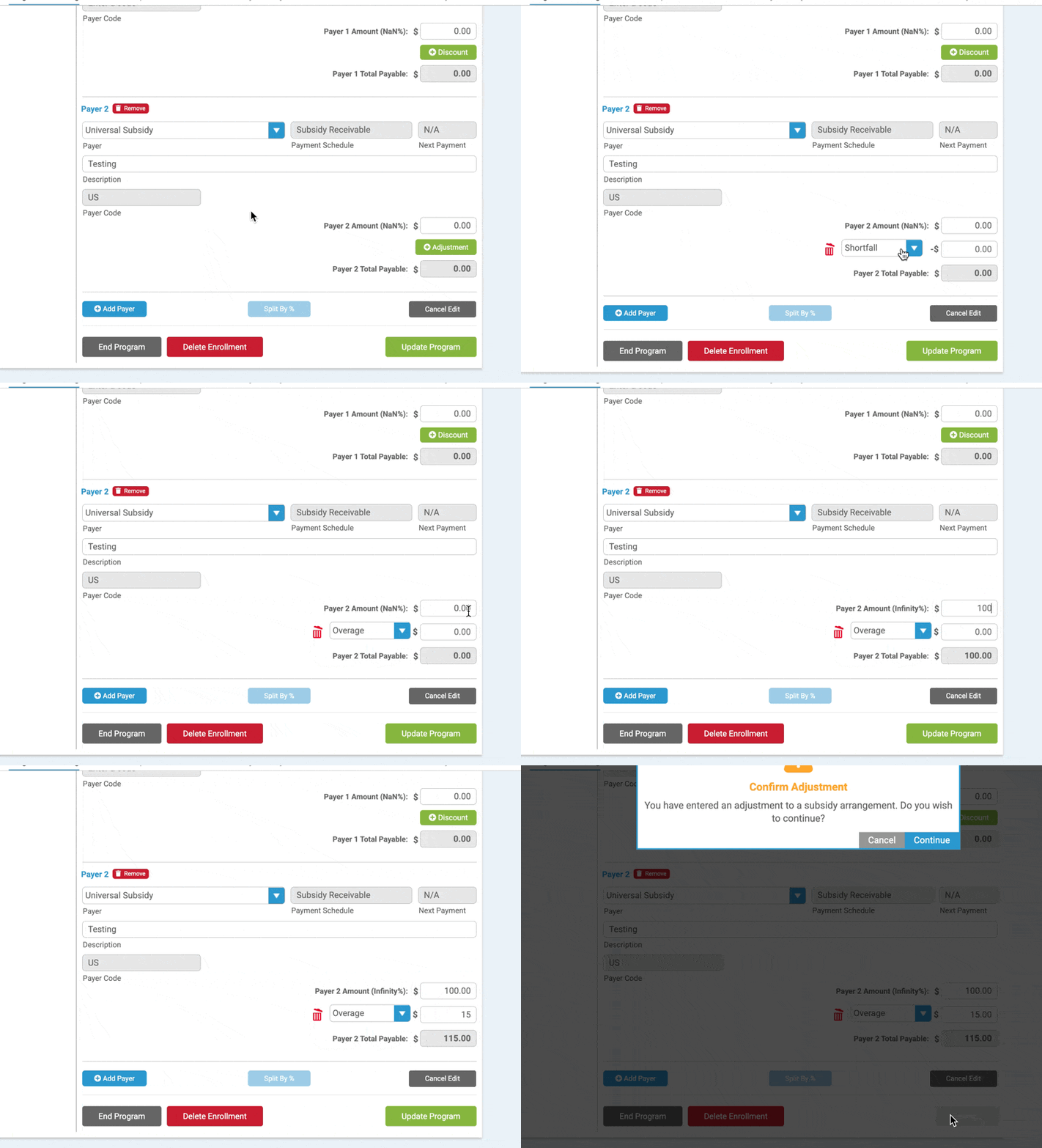
Because the parent responsibility has not changed, Kindertales now correctly expects the subsidy to pay more than the program's standard tuition amount.
Likewise, if a subsidy is expected to consistently pay less than the standard subsidy amount, you can record an Underage adjustment. This helps with forecasting known shortages.
Where You'll See the Adjustment
After the adjustment has been saved, the updated subsidy amount is reflected throughout the system.
Charges Page
The Charges page displays the adjusted subsidy amount as the expected payment.
For subsidy charges that have not yet been received, administrators can continue to edit the adjusted amount if necessary.
Subsidy Receiving Tool
The Subsidy Receiving Tool also displays the adjusted expected amount, allowing staff to receive payments against the correct total.
Benefits
Using Subsidy Adjustments allows administrators to:
- Accurately forecast expected subsidy revenue.
- Record known recurring overpayments or underpayments.
- Eliminate manual tracking of ongoing subsidy differences.
- Improve subsidy reporting and expected receivables.
- Ensure subsidy balances reflect what is actually expected to be received throughout the child's enrollment.
Important Notes
- Adjustments are only available for subsidies that have Is Adjustable enabled.
- This feature is intended for known, ongoing payment differences—not one-time payment corrections.
- The adjustment affects the expected subsidy amount while leaving the parent's financial responsibility unchanged.