![kt-logo-kb.png]](https://support.kindertales.com/hs-fs/hubfs/kt-logo-kb.png?height=40&name=kt-logo-kb.png)
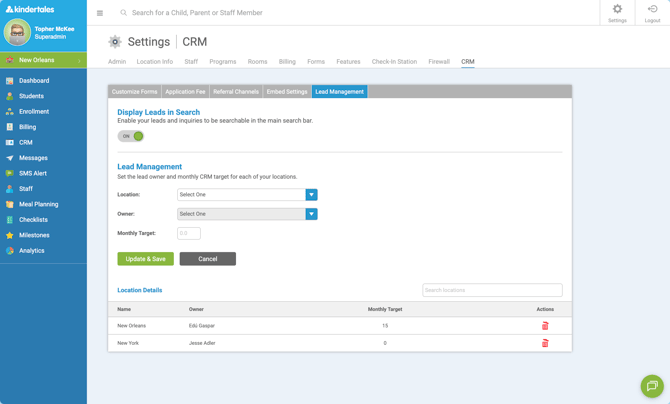
Lead Owner settings let you choose which staff member will be assigned as the default owner for new leads at each location. This setting is configured per location and applies to both Legacy CRM and CRM+.
Permission Required
Only Superadmin users can update Lead Owner settings.
Steps
- Go to Settings.
- Select CRM → Lead Management.
- Choose the Location you want to update.
- Select the Lead Owner for that location.
- Click Update to save.
Repeat for each location as needed.
Important Notes
- Per-location setting: Lead Owner is set individually for each location.
- Applies for both systems: This is done per location for both Legacy CRM and CRM+.
- CRM+ is not retroactive: Changing the Lead Owner in CRM+ does not update the owner for leads that already exist in the system—only new leads going forward will follow the updated setting.